fbpx

Skip the claim process

by visiting an in-network hospital or doctor

You do not need to submit a claim if you visit an in-network hospital or doctor. Medical care institutions will contact and send your claim to United Healthcare Student Resources directly. Remember to bring your insurance ID card for your appointment.

Submit a claim

for visiting an out-of-network doctor or hospital

If you visited an out-of-network hospital or doctor, you need to pay the bill yourself first, and then send documents to United Healthcare Student Resources to file a reimbursement claim within 90 days after the date of medical service.

Prepare Claim Document

itemized bill icon

Itemized Bill

You can get this from your care provider.

Learn More

proof of payment icon

Proof of Payment

An evidence that shows you have already paid for the service.

Learn More

copy of insurance ca icon

Copy of your Insurance Card

Download and print your insurance card at UHCSR.com.

UHCSR.com

close buttpon

Make sure all bills or itemized receipts indicate:

  • Diagnosis Code
  • Procedure Code
  • Date of Service
  • Cost
  • The Provider’s /Address/ Phone Number /Tax ID
close buttpon
  • Paid by card – Please provide a bank statement that includes your personal information and the care provider information.
  • Paid by cash – Please provide the receipt after the payment.
  • Paid by check – Provide the scanned copy or a digital version of both sides of your check.
  • Other payment types – Contact our representatives to get further support.

Services offered at Student Health Center and paid through your student account:

  • Paid with the remaining balance on student account – please provide a
    screen shot of your student account billing activity (without outstanding balance).
  • Paid outstanding balance on student account by card – please provide a screen shot of your student account billing activity (without outstanding balance) and a bank statement that includes your personal information and the school information.

Submit claim documents to UHCSR

Please submit the three documents to UHCSR through one of the following ways:

1 objects 22

Online Submit

Login to the uhcsr.com account, click “Submit Claim”.

1 objects 23

By Mail

UnitedHealthcare
Student Resources
P.O. Box 809025
Dallas, TX 75380-9025


Note: When sending claim information:
Clip, do not staple,
all bills to the completed form.

1 objects 24

Fax

Attention to Claims
Department 469.229.5625

Note: We recommend that you add a brief description explaining your claim or situation to facilitate the process.

Check Claim Status

To check on the status of a claim that you or a provider submitted, you will need to set up your MyAccount if you have not done so already. Please visit our My Account Center to log in to an existing account or to create a new one.

Understanding your
Explanation of Benefits (EOB)

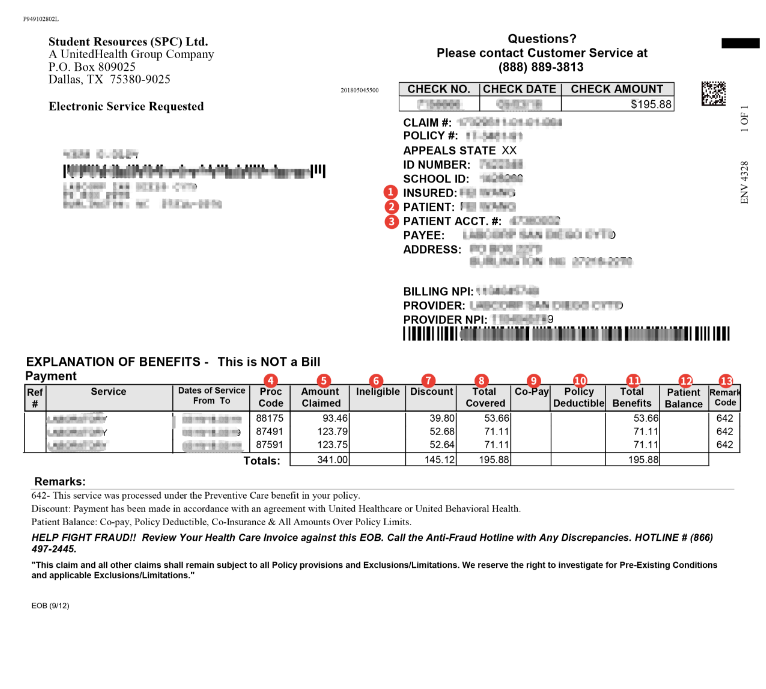
Your Explanation of Benefits (EOBs) can be viewed on UHCSR MyAcccount. Please note: It is not a bill. EOB explains what amount of your medical bill was paid by the insurance company and what amount is your responsibility.

1 objects 29

close buttpon

How to read the EOB

  • Insured: The person covered by insurance.
  • Patient: The person received the medical service.
  • Patient Account Number: A number assigned to the patient in order to identify a specific ac-count or date of service.
  • Procedure Code: Also called CPT Code, used to document medical procedures performed.
  • Amount Claimed: The dollar amount claimed by your provider.
  • Ineligible: Charges for services not covered by your policy.
  • Discount: Network discount if applicable.
  • Total Covered: Dollar amount for covered benefits.
  • Co-Pay: Dollar amount you’re required to pay for certain Covered Medical Expenses.
  • Policy Deductible: Dollar amount required to be paid before benefit payment is made.
  • Total Benefits: Total paid by your insurance.
  • Patient Balance: Dollar amount owed by insured.
  • Remark Code: The code is explained in the Remarks section.

Issue an appeal

If you have concerns regarding your processed claims, you can always issue an appeal. To file an appeal, please include the following information: 

  • Please log in to your UHCSR insurance account.
  • After logging in, go to “View Claims” to see all your claims. For each claim, you’ll find details such as the Patient Name, Provider Name, Date of Service, Claim Status, the submitted amount, and the reimbursed amount.
  • Locate the claim you need to appeal, then click “Request a Claim Review” under “More Options” to begin the appeal process.
  • Upload any supporting documents, provide a clear explanation, and once you’ve reviewed everything for accuracy, go ahead and submit the appeal.

Once the Claim Department receives your documentation, they will review your appeal and mail you a written response. The letter will include the findings, whether your appeal was approved or denied, and the reason for the determination. 

Need help? Talk to us.

At the heart of our customer support team are kindness and patience. Whether you need help navigating your health insurance, scheduling doctor visits, accessing your insurance ID, or filing claims, our dedicated representatives are here to guide you with care and expertise.

Contact Us